5 Unusual Notebook Tipps
I've been using physical notebooks for years now. After leaning into digital personal knowledge management for a while before that1, I now do most of my note-taking and writing with pen and paper.
And because I am a stationery nerd, I have also consumed a lot of content about using notebooks. Many of the ideas and "hacks" from those videos and articles made it into my practice, at least for a while. But I also noticed a few ways I'm using my notebooks that I haven't seen anywhere else.
So here are a few unusual tipps and tricks I have figured out or come across over the years:
1. How I use the ribbons/bookmarks
You will often hear other notebook enthusiasts mention how they keep at least one of the ribbons of their notebook at the next empty page, so they easily find it to jot down the next note.
This works fine, and if you are worried about forgetting what you wanted to write down within seconds, than this might be the right way to use the ribbon for you.
What I've come to realize is that I actually like flipping or rifling through the pages of my notebook as often as I can. It's these moments of "scrolling the notebook feed", so to speak, when I re-read and rediscover many of my older notes, which often leads to new inspiration, new connections to other notes or follow-up ideas (see no.4).
So I use the bookmark(s) to quickly find notes that I know I will reference later. But whenever I want to write a new note, I make myself look for the next empty page, thereby quickly flipping through the notebook, to introduce more serendipity into my notebook use.
2. Your notebook should annoy you (a little)
Now hear me out! I try to have my notebook at arm's length at all times. Most of the time, I have it in one of my trousers' pockets. In another of those pockets, most likely, is going to be my phone.
So, in order to grab my notebook more and my phone less often, I now stow my notebook in a way that is mildly annoying:
- If I wear cargo pants, I intentionally put my notebook in the same side pouch as my phone. This way, I have to fight my way past the notebook to get to my phone.
- If I wear jeans or other regular pants, I put the notebook in one of the back pockets. This way, I have to get it out whenever I want to sit down, because hell will freeze over before I sit on my precious notebook.
Two versions, same result: I force myself to take my notebook out before I grab my phone.
3. Turn it upside down
For regular notebook users, this might be nothing new, but there are many use cases for writing in a notebook from both ends. To get the most out of this, I recommend turning the notebook upside down so you get the usual writing experience from the back to the front. I you keep the regular orientation, you might get into trouble once you underestimate how many pages the next collection2 of notes might need.
I have used this for
- master task lists / backlog lists,
- larger collections that could become several pages,
- to-do lists, grocery lists and other non-permanent notes3
4. Only write on one side
This has been the biggest recent game changer in my note taking: When I write down an idea or a quote or something remotely serious, I use only the left of the two next empty pages.
On the right side, I often write down the source of the quote or what sparked an idea, but I leave most of the page empty for later additions, refutations or threading4 with other notes/pages.
This seems wasteful in the beginning, but it honestly has paid huge dividends. My notes get much more nuanced, wide-ranging and helpful when I have space to later expand on them. This might happen when I'm flipping through my notebook (see no.1), but I also revisite older notes in my finished notebooks quite regularly, and I often have something to add to them this time around.
And if I don't seem to need the right page, I just draw a sketch or let my kid doodle or put a sticker in or something. It's no problem, really.
5. Create your own shorthand/symbols
Once you start filling up notebooks with recurring categories of notes, it becomes increasingly hard to quickly find what you're looking for when you're searching a particular note.
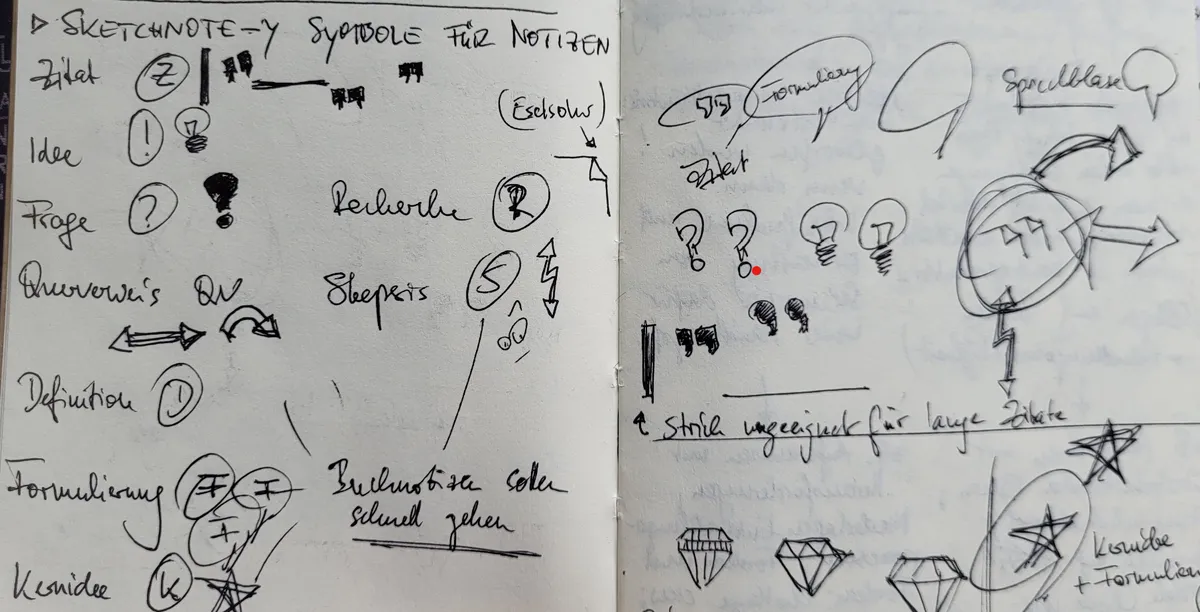
The classic way to deal with this is to create an index. Another option to make this a little easier is to draw little symbols next to your notes that signify a certain category.
In my notebooks, I use these symbols (and a few others):
- a light bulb for original ideas,
- a triangle for other people's ideas,
- a little dog-ear for things I need to research,
- big quotation marks for quotes,
- a speech bubble for well-written phrases and
- on those rare occasions, a quill for poetry or lyrics.
This is what it looked like when I tried to come up with those symbols in one of my notebooks:
So far for the first round of notebook tipps and hacks. I have quite a few more for at least a part two, but I'd also really like to hear from you fellow notebook power users out there. If you have any cool ways of using your stationery, don't hesitate to send my an email and tell me about it!

Footnotes
I've tried Notion, Roam Research, Bear Notes, Joplin, OneNote and Obsidian as well as a few lesser-known alternatives. I still use Obsidian as a digital commonplace book and, increasingly, to draft my blog posts.↩
This is what Ryder Carroll ("The Bullet Journal Method") calls notes that are dedicated to one particular topic or event.↩
Pairs especially well with a notebook with perforated last (or, if you start from the back, the first) pages.↩
Another Bullet Journal term. This means linking two or more notes or pages into a chain by writing down the respective page numbers of the other related notes.↩